Know who’s on the clock.
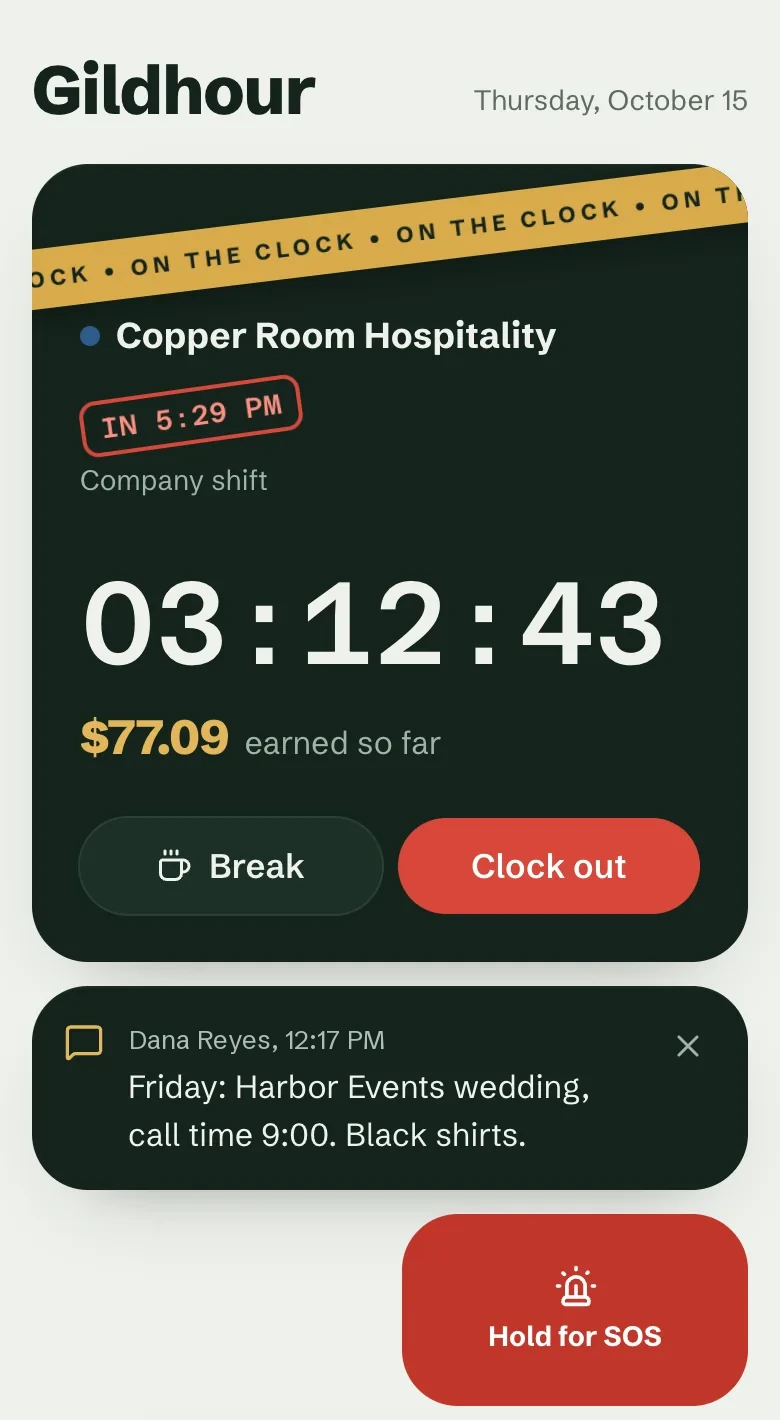
Your crew punches in on their own phones, and Gildhour proves they were on site: by location, a printed QR poster at the door, or a code on a kiosk screen. You schedule the week, watch a live map, get SOS alerts, then close the pay period and pay people.
No hardware to buy. $3 per active person a month ($28 minimum, one site included), with a 30-day free trial. You add a card to start it, and the first charge is made when the trial ends.
Working on your own? Keep track of your work, free
Gildhour
The Copper Room
IN 5:00 PM04:32:10
$81.65 earned so far
Everything your crew does on site
Sites, verified punches, a live map, SOS, the schedule and pay day, in one place.
On shift now · Harbor Events
- Maria L. Main hall3h 12m
- Dev P. Loading dock1h 40m
- Sam R. BarCheck-in overdue
See the whole team at a glance
Who is on shift, where, and who missed a check-in. Example board.
From first invite to payroll export
-
1
Add your sites, invite the team
Create the company, pin each work site on the map and share an invite code. Your crew joins from their own phones. No kiosks or badges to buy.
-
2
Choose how punches are proven
Location alone, a printed QR poster at the door, or a code on a kiosk screen that changes every 30 seconds. Location is checked on every punch.
-
3
Watch the board, close the period
See who is on shift and get SOS and missed check-in alerts. At pay time, check the hours with overtime, close the period and download the payroll CSV. Odd punches are flagged, not hidden.
Everything a shift needs, in one app
From a demo company: a live GPS map, SOS, the schedule, attendance and pay day, on the phones your crew already has.
Live GPS map
See where your crew is, right now
The live map shows everyone on shift and where they are, refreshed every 15 seconds. Tap a name to find that person on the map, or ask them to share their location. People are grouped by department.
Location is read only during a company shift. Nothing is tracked off shift.

Hurt on site, with no one in sight.
One press and hold, and every manager knows who needs help and where they are.
Safety
SOS with one press and hold
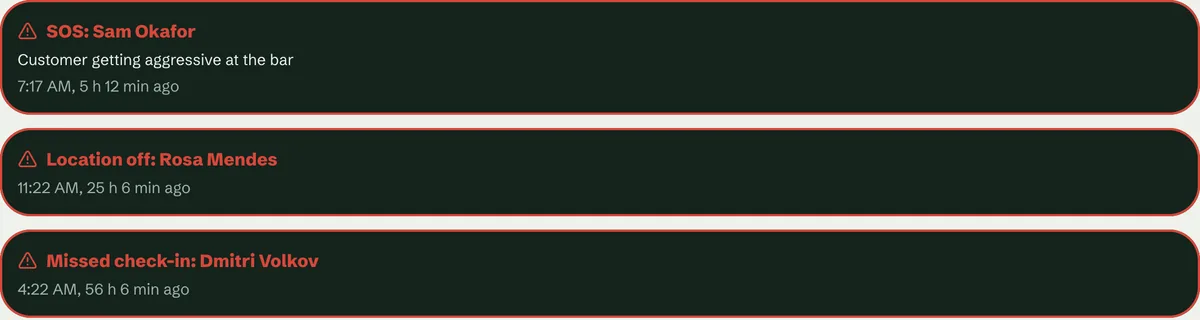
Your crew member holds the SOS button and every manager gets an alert with where they are, on their phone and their Apple Watch. Lone workers check in on a timer, and a missed check-in raises an alert. If someone turns off location during a shift you are told, and the alert clears when it is back on.
Scheduling
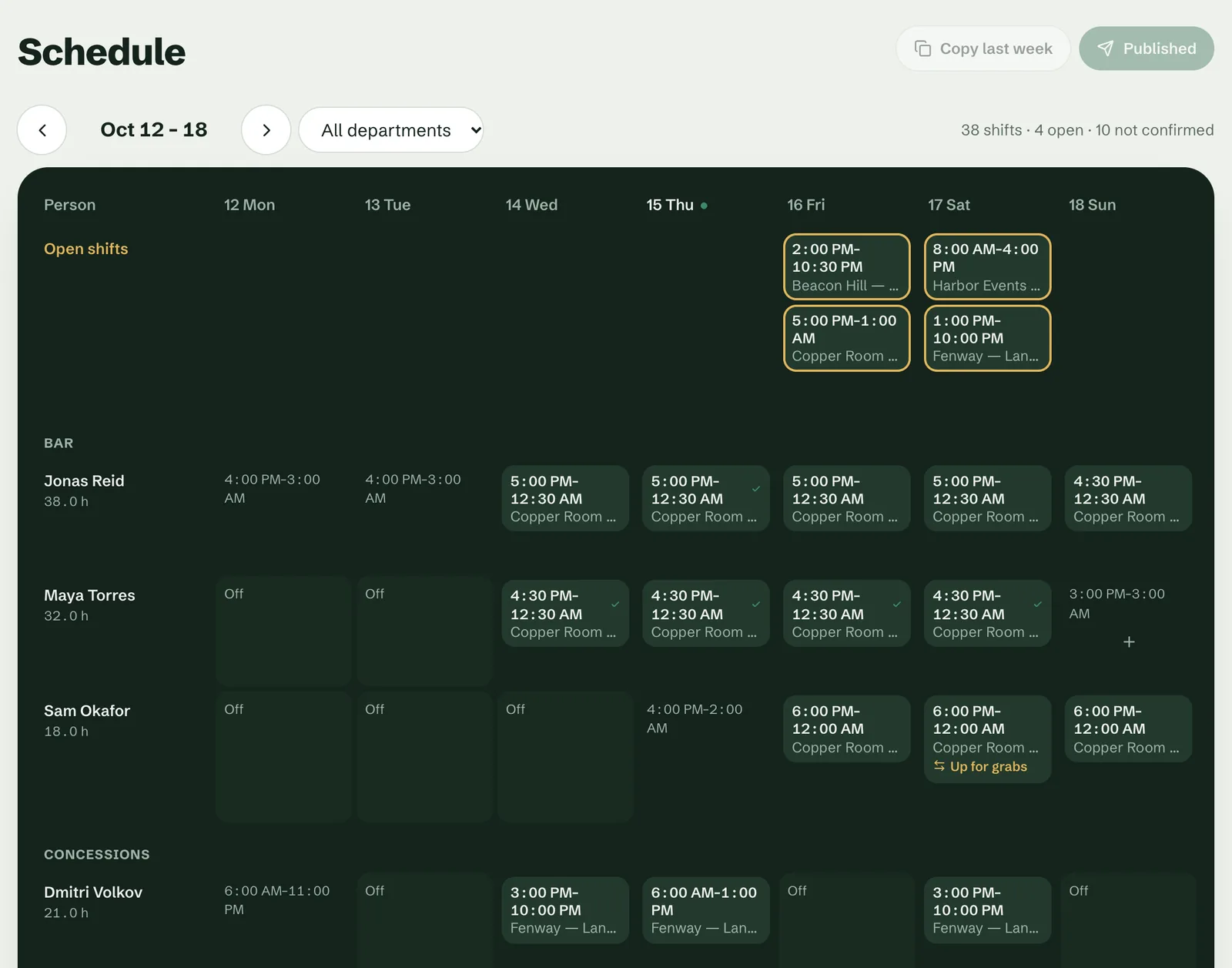
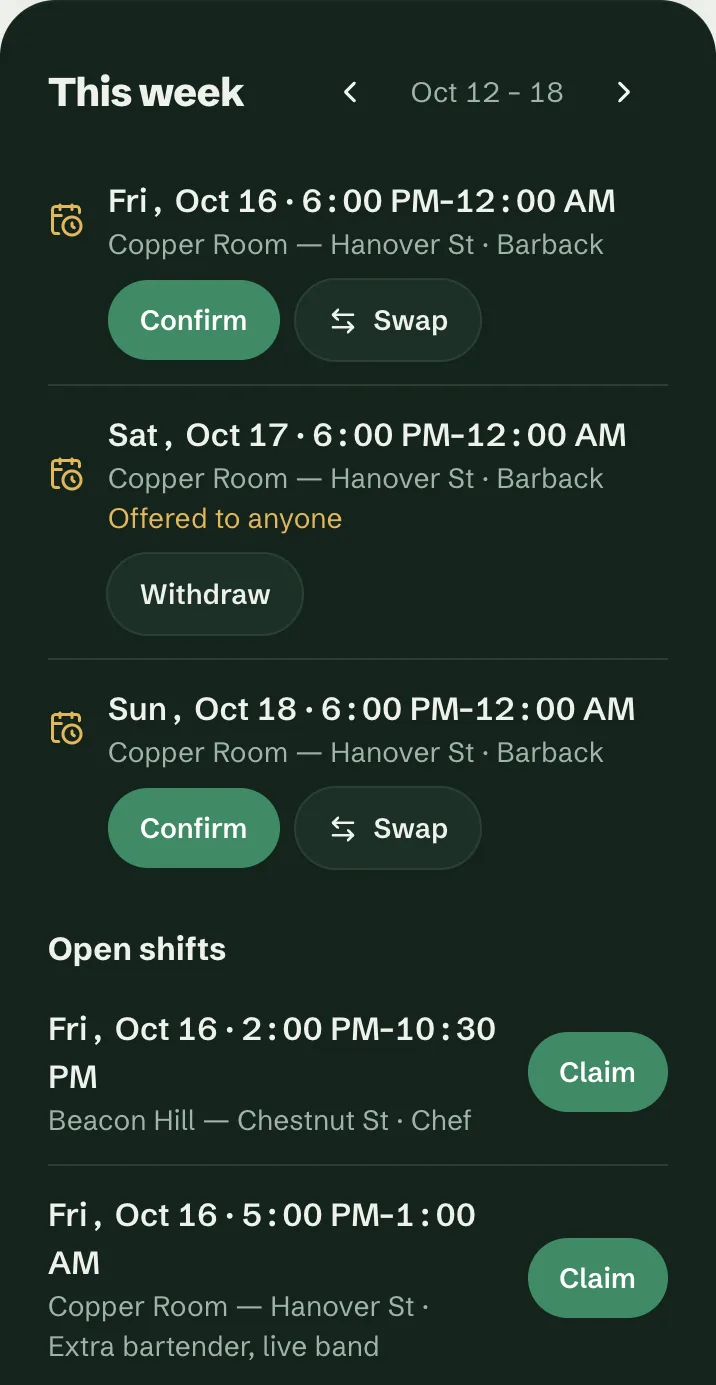
Build the week in minutes
Copy last week. Start from the week before, change what is different, then publish.
Open shifts. Post a shift with no name on it. The first person to claim it gets it.
Swaps. Someone can’t make it? They offer the shift and a teammate takes it, no phone calls.
Availability. Each person sets when they can work, and you are warned before you schedule outside it.
Confirmations and reminders. Your crew confirms each shift and gets a reminder an hour before it starts.
Departments. Bar, kitchen, front of house, trucks: group people the way your business runs.
Attendance
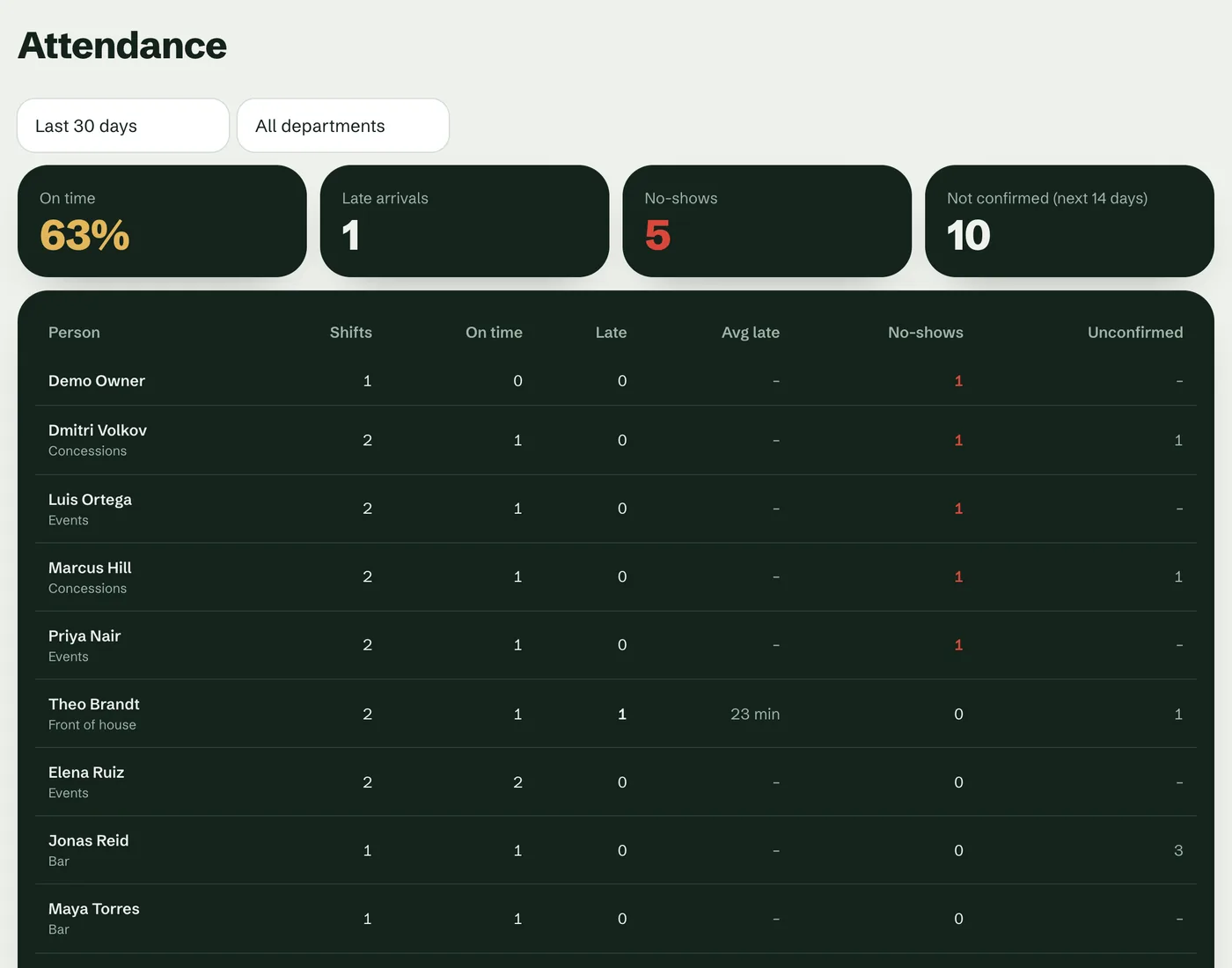
Who was late, who never showed
Every punch is matched to its shift. See on-time rates, late arrivals and no-shows by person and department, for the last 7, 30 or 90 days. Set how early people can clock in, and whether breaks are paid.
Pay now
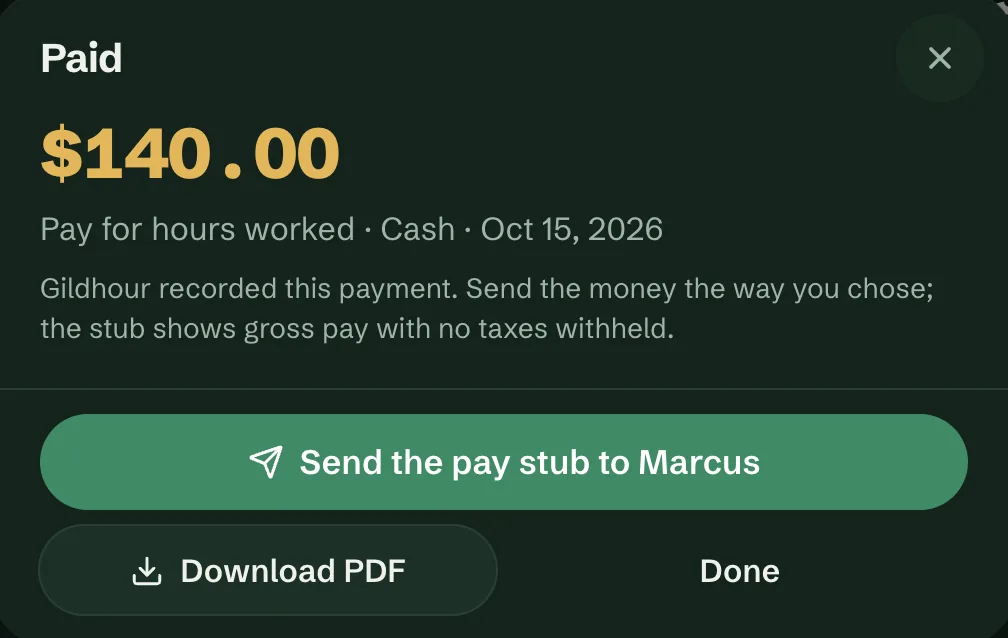
Pay someone today, with a pay stub
Pay a helper for the day, or give final pay when someone leaves, with the reason. Gildhour works out what is owed, records how you paid and makes a PDF pay stub you send to the employee by email or text. You send the money the way you choose. Gildhour never touches it.
Punches you can stand behind
Every punch records where it happened and how it was proved. Anything unusual is flagged for a manager instead of quietly accepted.
Location check. Punches far from a work site are flagged.
Printed poster or kiosk code. Proof you were at the door, not at home.
Odd punches stay visible. Sent late, wrong code, no site code: each has its own label.
Their phones, your sites
Nothing to install on your side and nothing to buy. Location is checked when someone punches in or out and, during a shift, for the manager map. Nothing is tracked off shift. Workers who go offline in a basement or a van sync their punch when the signal returns, and it is marked as sent late.
The app, on their phones
Your crew uses the Gildhour app on iPhone and Apple Watch: clock in with GPS, the site QR or the kiosk code, see the schedule, add tips at clock-out and hold the SOS button. Managers get alerts and a live map of who is on shift. Location is read at a punch, an SOS or a check-in, and during a company shift. Nothing is tracked off shift.
A back office for pay day
Managers use the website on a computer. Hours are ready to check, close and export, and Gildhour never touches the money.
Hours with overtime. Daily and weekly rules, counted in your company time zone.
Approve, fix, close. Fix a punch or add a missed clock-out. A closed pay period locks its punches.
Payroll CSV. For Gusto, QuickBooks Time (one row per day) or a generic CSV for ADP and other payroll tools. Gildhour does not run payroll.
Client invoices. Bill rates per client or site. Invoices come from approved hours, as a PDF, sent by email or text.
Built for the way your industry works
A kitchen, a care home and a roofing crew run very different weeks. Pick yours to see the schedule, the punches and the costs that fit it.
Hospitality and food services
3 industries
Retail and consumer services
3 industries
Professional and business services
5 industries
Health and social care
7 industries
Education services
1 industry
Facilities and maintenance
5 industries
Public and emergency services
2 industries
Entertainment and media
1 industry
Logistics and transportation
2 industries
Non-profit and community
1 industry
Industry and construction
2 industries
Coming from Homebase?
Homebase is free for a small team at one location and runs payroll. Gildhour charges by the person, with one site included, and adds safety alerts, an Apple Watch app and client invoices.
The full comparison| Feature | Gildhour | Homebase |
|---|---|---|
| How you pay | $3 per active person a month, $28 minimum, one site included | Free for up to 10 employees; paid plans $30, $70 or $120 per location a month |
| Tips tracking | Included | Tip Manager, $25 per location a month |
| Task manager | Company bundle, $20 a month | Task Manager, $13 per location a month |
| SOS and lone-worker check-ins | Safety add-on, $30 a month for up to 20 people | Not on their pricing page |
| Apple Watch app | Included | Not on their pricing page |
| Payroll | Payroll CSV for Gusto, QuickBooks Time and others | Payroll from $49 a month + $6 per employee paid |
Homebase prices as of 26 October 2026, from their pricing page. Annual billing there is about 20% less.
Your team gets the app in a minute
Send them the invite code. They download Gildhour, enter the code and see their shifts. Their own jobs and tips stay private on their phone; you see only the punches at your sites.
iPhone
- Download Gildhour from the App Store
- Tap Join a company
- Enter the invite code
Android
- Open this page in Chrome
- Open the browser menu
- Choose Install app
Working solo
Keep track of your work.
Freelancers, contractors, gig workers and anyone paid by the hour or the job: clock your time at each job, check you were on site, and add tips and miles. Free on iPhone, no account, and it works offline.
A tile per client or job
Its own hourly rate, flat fee or both. Tap to clock in, tap another to switch.
Tips and mileage
Tips at clock-out, miles per trip, and what each job really pays per hour.
On site, on record
Save the places you work. Clocking in and out checks you are there.
Private by default
Everything stays on your phone, and there is nothing to sign up for.

Miles and pay, per trip
Indianapolis to Columbus
- Distance
- 176 mi
- Earned
- $404.80
- Per mile
- $2.30
The app records each trip while you drive, with your time on the clock, and keeps the miles for tax time.
Made for crews and for people paid by the shift
Workers can use the app on their own, free, with no account. See how it fits each kind of work.
Questions
What does my company need to start?
Only their phones: there is no hardware to buy. A manager creates a company, adds the work sites and invites the team with a code. Punches are checked by location, by a printed QR poster at the door, or by a code on a kiosk screen that changes every 30 seconds, and the team board shows who is on shift, with SOS and lone-worker check-ins.
Can I schedule shifts?
Yes. Build the week by person and department, copy last week and publish. Post open shifts that the first person to claim gets, and let your crew swap shifts, set their availability and confirm each shift. They get a reminder an hour before it starts, and the attendance report shows who was late or never came.
Can I see where my crew is?
Yes, during a company shift. The live map shows everyone on shift, refreshed every 15 seconds and grouped by department. An SOS shows where the person is, and you get an alert if someone turns off location during a shift.
Can my crew use it on their own?
Yes. The app is free for anyone paid by the shift, with no account: hours, tips, mileage, a calendar of earnings and PDF invoices. Their own jobs and tips stay on their phone. Your company sees only the punches at your sites.
Is it free?
$3 per active person a month, with a $28 monthly minimum, billed monthly, and a 30-day free trial with everything on. You add a card to start the trial. Nothing is charged during the 30 days; the first monthly charge is made when the trial ends, and the plan renews each month until you cancel in the billing portal. That covers one site; each extra site is $25 more a month (driver trips are not sites). Add-ons: Safety (SOS, lone-worker check-ins and live trip tracking) for $30 a month covering up to 20 people, then $3 for each person after that, and client invoicing at $5 for each client you invoice in a month. If billing goes unpaid, only the back office pauses: punching never stops, and a company with Safety keeps SOS and check-ins. Employees of a paying company never pay. On your own, the iPhone app is free, with no account: up to 3 shifts a week, 100 miles of trips a month and 1 client invoice.
Do workers need an account?
No. Open the app and add your first job: there's no sign-up to track your own work. Create an account only to clock in for a company. An account signs in with a code we email you, so it needs your email address, or with a passkey (Face ID or Touch ID). There is never a password.
What if I lose my phone?
Your data lives on your device, so save a backup now and then from Settings, then Save backup, and keep the file in your email or cloud drive.
How does it handle overtime?
Set it per job: overtime after a number of hours a day, a week, or both, and the rate (1.5× by default). Daily overtime is counted first, so no hour is paid as overtime twice. For a company, the back office counts overtime for each pay period with daily and weekly rules in the company time zone. Check the settings against your state rules.
Can my accountant use it?
Export any week, month or year as a spreadsheet (CSV) with hours, pay, tips, mileage and expenses on every shift. Companies also get a payroll report for any pay period, for Gusto, QuickBooks Time or a generic CSV.
Does Gildhour run payroll?
No. Gildhour moves no money and files no taxes. It gives you checked hours, overtime, tips and totals for each person, and a CSV you load into your payroll tool. To pay someone directly, Pay now records the payment and makes a pay stub to send them, and you send the money yourself. You stay responsible for paying people correctly, so check the overtime settings for your state.
Can I invoice my clients from it?
Yes. Add clients with a bill rate, or a rate for each site. Invoices are built from approved hours, made as a PDF and sent by email or text. Mark them sent or paid. Gildhour does not collect the payment.
Is there an app?
Yes. Gildhour is an app for iPhone and Apple Watch. On your own it is free with no account, and your hours, tips and mileage stay on your phone. Your crew signs in with your company’s invite code and gets the schedule, site check-in, SOS and check-ins in the same app. Managers run the company from the website. On Android, Gildhour runs in Chrome and installs to the home screen.
Does it track my crew all day?
No. The app reads location only at a punch, an SOS or a check-in, and during a company shift for the manager map. Nothing is tracked off shift. Push notifications carry no message text.
Which currencies does it support?
US, Canadian and Australian dollars, euros, pounds, Mexican pesos, Brazilian reais and Argentine pesos, with miles or kilometres.
Who makes Gildhour?
Gildhour™ and the Gildhour logo are trademarks of iMix Labs. © 2026 iMix Labs. All rights reserved.